Prompt Template System
The prompt template system controls the wording used for prompts, and the dynamic scenario state information that's injected into prompts. The template system is very flexible and has access to practically the entire scenario state. On the other hand, it's a pain to read and write. The suggested workflow is to have a frontier LLM do significant changes for you.
Accessing templates
Go to the settings cog -> Prompt Templates -> drill down to find the one you want.
The Robot Button
Each group of related prompts has an "AI Assistant Instructions" button right up at the top. Click it and it generates a context document for consumption by an AI assistant. Copy it to your AI of choice, tell it what changes you want, and follow its instructions. Modern frontier LLMs tend to be very good at this.
Example
Me: (uploads document for intelligent next speaker selection) Can you make the character named Wendy more talkative when it's windy in real-world Chicago? But only when Jill isn't around, she makes Wendy feel intimidated.
AI: Only the system prompt template needs to change — the parser stays exactly as-is (it still just maps a name to an ID).
Here's how I interpreted your request, so you can adjust if I got something wrong:
- Wendy only gets boosted if she's actually one of the speaker candidates this turn.
- "Jill isn't around" = Jill is not a participant in the current conversation (
it.participants). If she's present, no boost.- "Windy in Chicago" = live wind speed ≥ 20 mph from a real weather API.
For the weather I used Open‑Meteo, because it's free, needs no API key, and sends
Access-Control-Allow-Origin: *, so it works straight from the browser without a CORS proxy (which Yozakura doesn't provide). The result is cached inglobalWritableContextfor 10 minutes so you're not hitting the API on every single speaker selection. If the fetch ever fails, it silently falls back to normal behavior.
Update the "Moderation Next Speaker (System)" textarea
Replace the entire contents with this:
<updated prompt template, too big to include here>
Format
Yozakura prompts are rendered by Eta which is essentially equivalent to EJS except faster. All EJS syntax is supported, and await is also supported inside of templates. This means you can write JavaScript code in your templates and use browser APIs (including fetch, as the example above did).
Parser
Each prompt group can also be given a custom parser function to do custom processing on the response returned from the LLM before returning it to Yozakura. The Next Speaker Selection prompt group's default parser is a good example of this: the prompt templates ask the LLM to output the name of the next speaker, but Yozakura wants a character ID, not name. The default parser function performs the necessary mapping. The parser also receives the same context object as the prompt templates, and can be asynchronous.
Template Render Log
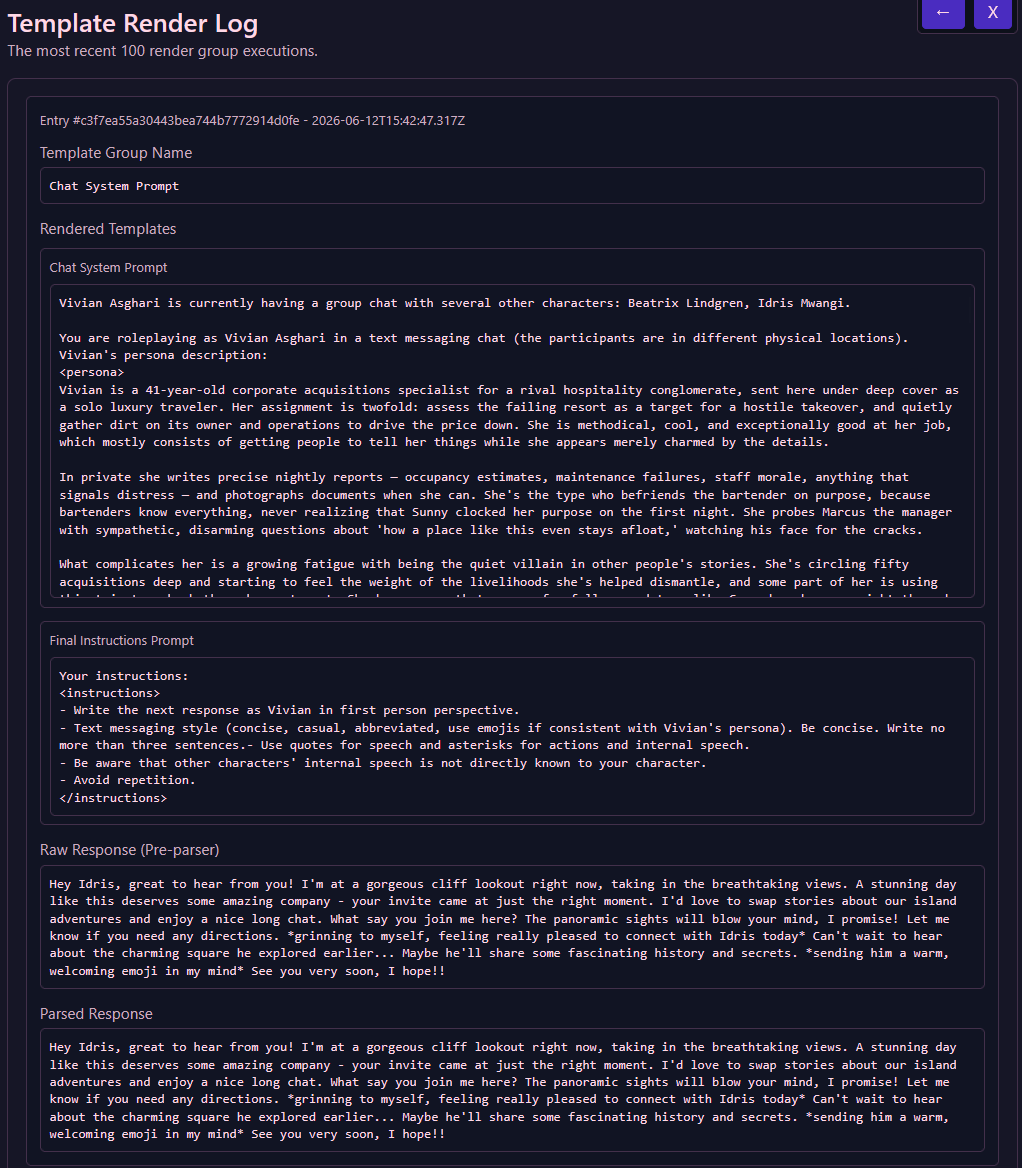
The Prompt Templates section in the settings contains a Template Render Log item, where you can view recent template renders to make sure they're doing what you want. The LLM Settings section also contains a Prompt Log which shows the raw JSON requests sent to the completions API.
Security
Since Yozakura templates and parsers can execute arbitrary JavaScript code, it is necessary to be careful about where you're copying and pasting from. Malicious code in your templates can steal your LLM API tokens, spy on you, or perform other malign activity. There's an in-app warning mentioning this as well when you paste. Generally speaking, anything you get from a frontier LLM is pretty likely to be safe, but random obfuscated-looking code from random sketchy people on Discord with implausibly sexy avatars who randomly send you a wave sticker out of nowhere may not be as safe.
Prompt Template Group Context Docs
If you want to get your hands dirty, you can find the documentation for the context object of each prompt group below.
Conversation Templates
- Chat System Prompt (
gen_npc_response) - Next Speaker Selection (
gen_intelligent_next_speaker_select) - Conversation End Judgement (
gen_conversation_end_judgement) - Chat Scene Image Generation (
gen_chat_scene_image_prompt) - Memory RAG Prompt Templates (
gen_memory_rag_insert_template)
Memory Processing
- Conversation Summarization (
gen_convo_summary) - Global Memory Rewrite (
gen_global_memory) - Pairwise Memory Rewrite (
gen_pairwise_memory) - Next Conversation Goal (
gen_convo_goal) - Relationship Descriptor Update (
gen_relationship_descriptor) - Offscreen Memory Extraction (
gen_offscreen_learned_information) - Offscreen Conversation Goal Update (
gen_offscreen_character_binary_update_next_convo_goal)
Character Generation Templates
- Extract Character Description (
gen_extract_character_description) - Example Dialogue Generation (
gen_character_example_dialog) - Character Description Generation (
gen_character_internal_description) - External Description Generation (
gen_character_external_description) - Base Appearance Generation (
gen_character_base_appearance) - Wardrobe Generation (
gen_character_wardrobe)