API Setup
Yozakura requires you to bring your own AI LLM model/subscription (and optionally an image generation model).
You can run these models on your own machine if it's powerful enough, or use a cloud provider. Both approaches will be covered in this document, with suggested software and providers.
Local LLM
Yozakura can be powered by models that run on regular consumer hardware. A modern graphics card will help, the beefier the better, but some weak models can run purely on CPU and still provide an acceptable experience. Check here for some suggestions.
The suggested software for running a local LLM is KoboldCpp, but any other application that exposes an OpenAI compatible completions endpoint will do.
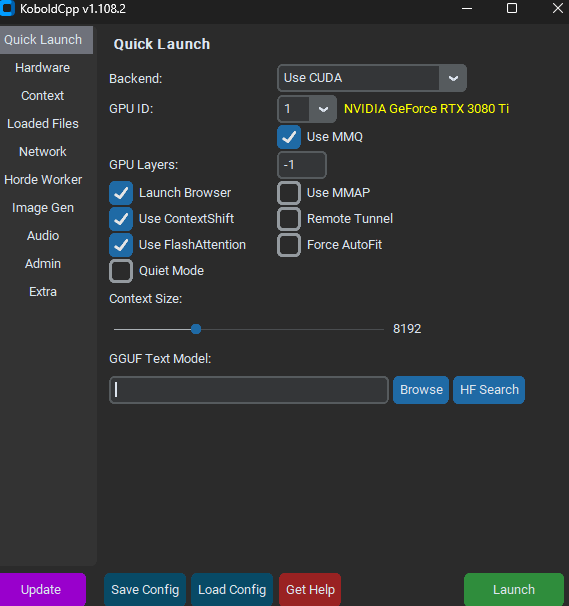
In KoboldCpp select the "Browse" button and choose your model file, then click Launch. If it's successful, a browser window will pop up with a chat interface. You can just close that, or type some messages to test it out.
Then you can start Yozakura and you're good to go. When the initial setup popup appears, the Completions API Setup section will already have the correct values for KoboldCpp, so you don't need to change anything there, if you launched KoboldCpp as described above.
In KoboldCpp, you may want to consider increasing Context Size if you want to have longer chats. The default of 8192 is generally enough, but doubling that adds headroom for longer chats. I expect very few people would need higher than 16384, as the nature of Yozakura tends to keep chats shorter than those you might have in SillyTavern or similar. If, during a longer chat, the quality of responses suddenly degrades severely, you may be exceeding the limits of your context size. At the time of this writing, Yozakura won't detect that for you.
Local Image Model
Since we're already using KoboldCpp to run the text model, we can use it for the image model too. But Yozakura supports a variety of other software as well. KoboldCpp is pretty easy and convenient but you might get better performance and lower VRAM usage with other software.
For an image model, WAI Illustrious SDXL is a good baseline model for manga/anime style images that follows prompts well.
In KoboldCpp, go to the Image Gen tab and browse to your model under Image Gen. Model. If you intend to use LoRAs, enable the "Runtime LoRAs" checkbox, and browse to your LoRA folder next to LoRA Dir. Consider enabling Compress Weights if you need a smaller memory footprint.
Click launch, then you can start Yozakura and you're good to go. When the initial setup popup appears, the Image Generation Setup section will already have the correct values for KoboldCpp, so you don't need to change anything there.
Cloud LLM (OpenRouter)
If your machine can't comfortably run a local model, or you just want the better narrative coherence that stronger models can often provide, use a cloud provider instead.
OpenRouter is an excellent provider that enables access to a huge number of models with pay-as-you-go pricing. But any other provider exposing an OpenAI compatible completions endpoint will work too.
Setup:
- Create an account at openrouter.ai.
- Buy some credits on the Credits page.
- Create an API key on the Keys page.
- In Yozakura's initial setup popup, under
Completions API Setup(if you already closed the popup, the same fields are under Base Defaults in LLM Settings):- Completions API URL:
https://openrouter.ai/api/v1/chat/completions - Bearer/Auth Token: your OpenRouter API key
- Model: a model ID from the models page, see below
- Completions API URL:
- Click
Test Connectionto confirm you can connect.
For the model, deepseek/deepseek-chat is a decent choice, but it's a good idea to try several models and find one you like. Yozakura makes a lot of LLM calls with all the NPC chatting and memory processing, so keep that in mind as you budget. In my experience each default twelve-message NPC chat with deepseek/deepseek-chat costs about a penny. Using the latest models from Anthropic, OpenAI, or Google could cost much more (and may be overkill).
You can also choose to use different models for different tasks. That is covered here.
One note on privacy: OpenRouter routes your prompts to the underlying model providers, and some providers may train on your inputs. You can restrict this in your OpenRouter privacy settings.
Cloud Image Generation (OpenRouter)
OpenRouter can also handle image generation, and it works through the same https://openrouter.ai/api/v1/chat/completions endpoint as text completions (covered above). Its options are more limited in some ways compared to other image model providers like NanoGPT, but since we already talked about it above, we'll use it here too.
To use OpenRouter for images in Yozakura: in the initial setup popup under Image Generation Setup (or in Image Generation Settings):
- Change Image Generation Provider to
OpenAI Completions Style (Including OpenRouter and Similar). - Image API URL:
https://openrouter.ai/api/v1/chat/completions(the same URL as the text API) - Bearer/Auth Token: the same OpenRouter API key
- Model: an image-capable model, for example
x-ai/grok-imagine-image-quality. On the OpenRouter models page you can filter by image output to see what's available. - Click
Test Connection.
Image generation is typically priced per image rather than per token, usually a few cents per image depending on the model.
GPU Settings
On NVIDIA graphics cards, you may want to consider changing the CUDA - Sysmem Fallback Policy to Prefer No Sysmem Fallback in the NVIDIA Control Panel, especially if you're pushing the limits of what can fit in your GPU's VRAM. This will prevent your graphics card from partially offloading models to system RAM, which tends to make them unusably slow if you allow it to happen. After changing this setting, the system will do its best to squeeze everything into GPU VRAM instead, but if there's really just not enough space, your LLM or image gen application will crash, and/or other programs you're running will glitch graphically and crash. Sometimes rebooting your PC and not opening any other programs before using Yozakura will give you a bit of extra headroom.